Cover it up!

  It’s been quite a busy and stressful week, we recently had a change in administration which brought on some chaos this week with the kids not exactly knowing the authority figure in the school. Luckily things began to calm down as the week progressed and I have high hopes with a new consistent authority figure in the school beginning next week we’ll be back to normal! I’ve been getting a horrible case of cabin fever though. If you know me I LOVE to travel and I think with all the snow and the monotony of the school day I’ve got ants in my pants and I’m ready to GO SOMEWHERE..I know it’s only been three weeks since TMEA but..I’m ready for another adventure!

This month is Music in Our Schools Month.  I have been planning occasional special things from week to week and one thing I like to do is bring in current or recent hits and play them to have a quick discussion at the beginning of the class. It is a great listening activity, gets the students roped into the lesson, and promotes listening to music outside of the classroom in a different way.

This week I did a quick discussion of a song cover. We discussed how one can have an original song and then another artist can take that song that is already recorded and shared and make it their own and record it to share. We talked about how not all the songs on the radio are written by the singer they hear singing it some of them are covers where the singer they know redid someone else’s song.

The great part about Youtube is that you can find song covers from many people. We focused on the song “Let it Go” from the movie Frozen.

With the Alex Boye one we had a discussion on how covering a song can leave you open to really be creative with a song you already know and do your own thing. With the video from Jimmy Fallon we talked about how even though it is Queen Elsa singing it, it is still a different song because of the instruments being played in the background, in order to cover a song it needs to be different from the original…and then I promised them I would try to get them together to play the Jimmy Fallon version next week!

Every single class asked if we could do this again next week with a different song.

 A couple other cool covers you can do this discussion with?

Roar by Katy Perry- The Glee Cast does a great cover

Mario Theme song, Play the original and then search for it on Youtube played by an orchestra there are a few great arrangements out there.

What are you doing for MIOSM? How are you going to make it special for your students?

IMG_0704

Playing in the Sandbox: Creating Excitement for Tech by Playing

  This week I’ve had the privilege to guest speak at a college class up at my Alma mater Plymouth State University. I had the same opportunity last year but only went up to speak for a day, this year I had two class periods to share my knowledge and resources on music technology in the elementary music classroom. Day 1 consisted of blowing their minds with as many resources as possible (I think I saw some smoke) but Day 2 I really wanted them to get their hands on a lot of what I was talking about. So after a quick sharing session on some websites they had already tried out, we did a tech sandbox.

What is a Sandbox?

The term Sandbox is a place to “try things out with coding or software without actually destroying the world;” a place to try things without committing them to an actual finished project. (http://bobsprankle.com/bitbybit_wordpress/?p=3018)

In other words, just like a real sand box you get to play with all the tech tools. There are three main things you get from a Sandbox:

  • Hands on time with a product, you get to see and feel it for yourself, therefore learning more about it then just hearing about it from another source.
  • Experimentation; your mind works differently than the person next to you. Use Sandbox time to bounce ideas off others in the room, see how many things you can figure out about the piece of technology before recess time ends.
  • No fear of failing. Don’t you hate that feeling of getting so pumped to try something new in your classroom only to see it fail? Use Sandbox time to try out those new ideas before it hits your classroom. With others around you, you can experiment and get feedback to create the perfect activities with your new tools.

It is also a great way to have fun while you learn! It was really cool to see the students in the classroom have such a great time playing with the tech I brought. The Makey Makey was probably the star of the show!

IMG_0270

PSU Students making a music stand piano!

   Want my powerpoint of resources for this class? Check out the link below and click on the PSU Elementary Methods link for download:

http://www.cdwinal.com/conferencepresentations.htm 

Why I Stand Up For Music: A Success Story

This post has really been a long time coming. I’ve toyed with the idea but was uncomfortable for a while with posting it online and never really knew how to word it until deciding to just start getting it on the page. Do you know why this blog is called “Day in the Life of a Backwards Musical Mind? Well today, I’m finally going to tell you.

Did you know?

Children who study a musical instrument are more likely to excel in all of their studies, work better in teams, have enhanced critical thinking skills, stay in school, and pursue further education.

Elementary age children who are involved in music lessons show greater brain development and memory improvement within a year than children who receive no musical training.

Learning and mastering a musical instrument improves the way the brain breaks down and understands human language, making music students more apt to pick up a second language.
(Dosomething.org)

When growing up I tended to get really frustrated in school because I couldn’t pick up concepts as well as the other students. The teacher would be moving on to the next thing and I would still be trying to figure out what was still in front of me. I had trouble wearing certain clothes, and even eating certain foods, I also had a lot of trouble in sports finding it hard to even catch a ball. When I was old enough it was finally revealed to me I had slow processing issues, a sensory disfunction (still can’t wear certain clothes or eat certain foods) and little fine motor control. Now, one would think that with all these obstacles put in my way it would be a little detrimental to my every day life, but with involved parents like my Dad who would work a full day and yet still have time to come home and play catch with his little girl before dinner, or my Mom who would sit down with me for hours to get my homework done I managed to make it through better than before.

What really began to make a difference in my life is when I was “forced” by my Mom to begin taking a musical instrument in forth grade. I use the term “forced” very loosely. It was more of “You want to play an instrument? Flute or Clarinet, 2 years minimum and if you want to continue great, if not I’ll understand.” Almost 15 years later my flute is still being played and I have music as another reason to thank for learning how to adapt and overcome obstacles I faced early on in my life.

Walking into music I was on a level playing field.

    In the classroom I might have been behind, but in music I was on a level playing field. It was a place I could excel if I really tried. In subjects such as Math or even Science you have a specific way to think about how to solve a problem, a lot of the time I would get stuck on a math problem because I had problems processing the original way to solve it so I tried to think of a different way..not all the time it would be correct. Overall subjects like math and science just became frustrating . In music, I could think of 500 different ways to play or listen to a piece and they could all be right.

  Music plays an important role in language. Similar areas of the brain are activated when listening to or playing music and speaking or processing language.  (http://scienceblogs.com/cognitivedaily/2008/06/19/does-music-help-us-learn-langu/ )

    Learning how to read and play music lead to helping my brain process language. I found the more I practiced my instruments and sang, the faster my brain adapted to processing conversations I would have and reading words on the page. It became a way to speed up those parts of my brain. I eventually was able to take the ways I read music and bring them over into other areas of my life to begin to adapt and overcome. I still can read a sheet of music faster than I can read a page in a book.

      Music also gave me a new found confidence which lead to so many other changes in my life.

  •       Music is unpredictable, while being use to comfortable surroundings knowing what was going to come next was all good. I began to be ok with making mistakes and throwing myself into uncomfortable surroundings. I still get nervous at certain new adventures but now know being uncomfortable is ok and things will become easier the second time around.
  •       Playing an instrument helped improve my fine motor control. The more I practiced my flute the better my fine motor skills became. It made me use my smaller muscles such as tongue and fingers on a regular basis. I remember going to PT, OT, and all the other Ts out there, playing an instrument was the best therapy.
  •   It helped me to persevere. When I didn’t get the song the first time I played it over and over again until I got it right, and that quality carried over into other parts of my life.
  •       And after a busy day, with so many insecurities, unprocessed things, and stress over uncomfortable situations. Coming home and closing the door to just sit and play provided needed solace to clear the things bouncing off in the white padded walls in my head.

  Music helped me overcome and adapt, it helped me grow up. When I began to study music education in college I had trouble getting through certain classes. All I had to do was remember what I had to do to get there and that’s all I needed to get through. Now as a music educator I find myself seeing the same qualities I had when I was younger in some of my students and remember how hard it was for me and how music was that relief, that strength I could build my confidence on. It allows me to relate and always have hope even for the tough ones.  With technology in the mix, it not only helps my students, but turns my weaknesses I still have and into my strengths.

     I stand up for music in the schools because it gave me so much. It pushed me over obstacles that were miles high, and showed me I could excel if I pushed myself. I’ve gotten so far so early in my life because of it and know there are so many students out there who can benefit from it just like I did. No matter what twists and turns my life will bring, I will always come back to music. Just like I stand up for it, it stands up for me.

What makes you stand up for music? What’s your story?

1926865_10100104981328817_1545305678_n

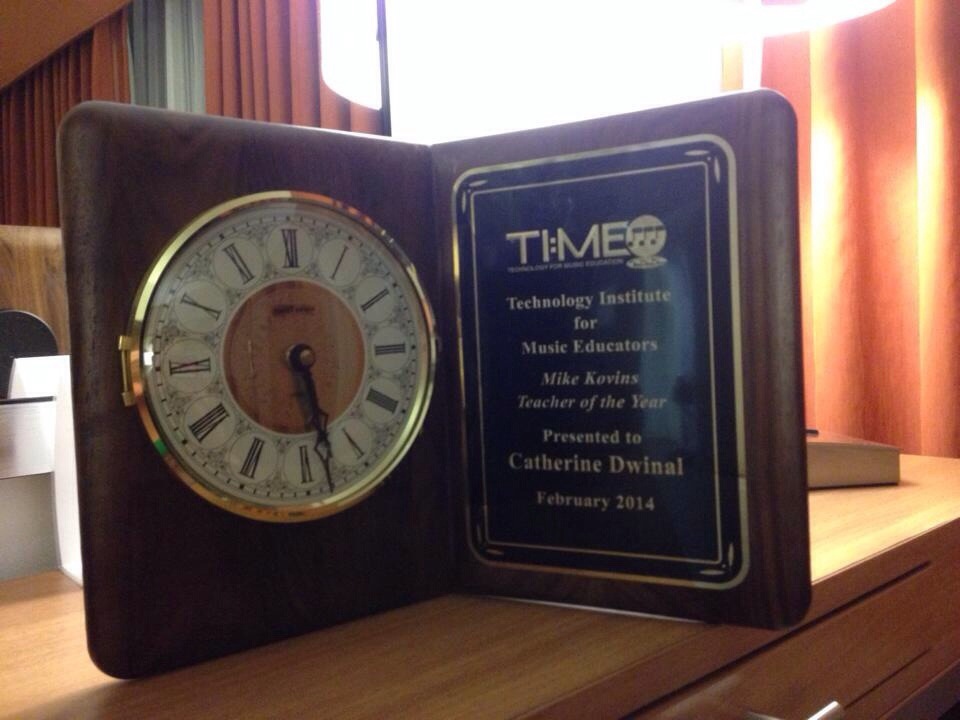
Receiving the TI:ME Teacher of the Year award from the amazing Amy Burns

Joytunes; Apps and Games to Get Kids Playing

So it has been a weird week, I just got back from Texas and this coming week is winter break. I have been really sitting in limbo.  It is truly difficult to teach anything new the week before break but since I just returned from another amazing TMEA conference I’ve been experimenting with a few  tech tools and different ways to use them in class. One being the Joytunes family of products.

Have you ever heard of Joytunes? They have a fantastic set of practice products for students learning recorder and piano.

I’ve found myself using these apps with my recorder students and my after school piano students all the time seeing great results in the process especially with their piano apps. The thing that makes Joytunes apps stand out to me is the way it recognizes real instruments allowing the user to control the game using a real recorder or a real piano. One of the arguments music teachers make when debating about technology in the classroom is that it takes away students experience with a physical instrument. What these teachers do not know is that with the advances in technology, that argument is no longer valid and using an app like the ones Joytunes provides with a built in microphone we can turn a piece of technology into a valuable practice tool.

With all of these tools, I have found ways to use them inside the classroom and outside. 

  • Playing Recorder Master as a class.
  • Having students play Recorder Master as an assessment logging their scores.
  • Practicing Recorder Master at home
  • Using Dust Buster or Piano Mania as a warmup or incentive tool for private lessons.
  • Having those students whom I can’t fit into my private piano schedule learn beginner piano at home using one of the piano apps.
  • Learning about different national anthems using the Piano Summer Games app
  • Printing out some of the free sheet music for my piano students or students who want piano music.

     The possibilities become endless.

    Have I peaked your interest yet? Are you trying to tell me you do not have an iPad? or maybe you can’t afford such a mystical tool. Head to joytunes.com where you can play the recorder games for free right on the website all you need to do is make sure you have a microphone somewhere on your computer. The website also offers free piano sheet music for beginner piano students!

To download the Free apps click on one of the following links below:

Dustbuster:  https://itunes.apple.com/us/app/id502356539?mt=8

Piano Mania: https://itunes.apple.com/US/app/id604699751?mt=8

Piano Summer Games: https://itunes.apple.com/app/id540759434 

Recorder Master: https://itunes.apple.com/app/recorder-master/id492065346

How do you get your students interested in practicing?

IMG_0268

TI:ME/TMEA 2014

  Do you know how amazing this past week has been? I have been waiting for months to be able to head down to San Antonio for TMEA and meet up with wonderful people that I only get to see maybe once a year. Along the way I met up with so many new faces this year and  absolutely loved to see smiles when I presented my solo session and was even more thrilled to present with the amazing Amy Burns. You know what my favorite part was out of the whole week?

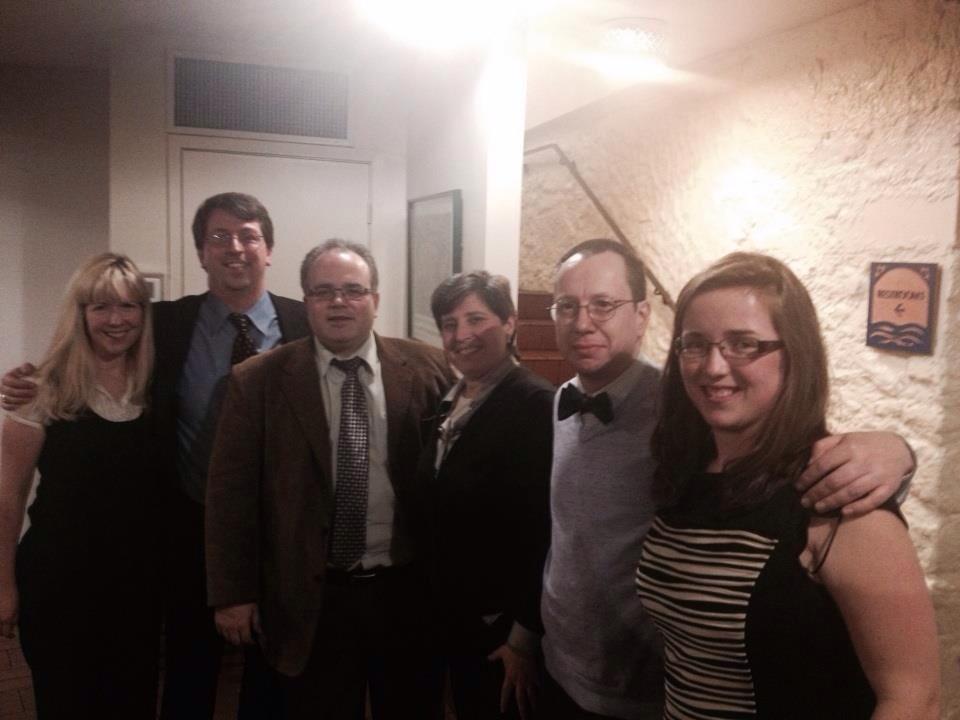
1622832_10100104981014447_2094006784_nI get to be a part of this amazing group

TOTYs! (Next year we need to do the Dr. Who inspired pic)

         What ever happens next year I will always be  inspired to push forward and continue to ensure students in the music classroom are receiving the best education with the help of technology, TI:ME is a group of leaders and innovators and I am proud to be a part of it . I am truly blessed to have so many people looking out for me. I cannot wait to raise the bar and push forward into the further. Next stop, my masters!

      If you’re sitting here saying “Man I am jealous, a great conference..AND 80 degree weather?” then start planning for next year and I will see you there! If you have never come to TMEA then you NEED to go next year! It is a must!! From the sessions, to the exhibitor booths (I hear that Quaver Music booth was pretty hopping), to going out and having dinner with long time friends you only get to see once a year is an event you can’t help but look forward to.

    Looking for session materials? Here are some from TI:ME members who have put theirs up online already:

1926865_10100104981328817_1545305678_nBack in the snow may stink, but this picture will remind me to keep smiling 🙂

Looking to the Left, gazing to the right and always staring forward

2 days have flown by here at TMEA/ TI:ME. I cannot believe I’ve been here for two days already and only have one more day..I might cry. It has been amazing, I’m not use to the attention being on me so being the TOTY this year has been really cool. We are really one big family and being down here is one big family reunion..why can’t we all work in the same school? It would make life so much more fun! Being the youngest TOTY is kind of fun too, it is very humbling to have so many people remind me of how much I’ve accomplished in such a short amount of time and it reminds me I’ve still got a long ways to go. Time to stand up and believe I am a leader and act on it.

(This is sort of a late night rant) It surprisingly still shocks me when someone I have just met judges me as a tech savvy high school/college student still. I graduated with my undergrads over 4 years ago…c’mmmoooonnnn people! I was sitting in my friend Amy Burn’s session yesterday and helped a woman download the Guidebook app for the conference. She was pleasant enough and thanked me before starting a conversation. We discussed how un tech savvy she was (her words) before she asked me which college I attended…I promptly excused myself to go see if Amy needed assistance with her projector and then came back and replied “actually I’ve been teaching 4 years, I’m presenting next.” Her jaw might have dropped a couple of stories with that remark. It got me thinking though, not many young people like myself are pushing themselves to do things like I am. I would say I might be one of the youngest presenters here. To me it becomes a challenge to get more young presenters out and about. We need more young leaders ready to step up for when it becomes time. There are not many my age around and it’s time to change that. We have just as much to say as the next person and should not be afraid to say it especially when it comes to technology. Why aren’t you putting in conference proposals? Why aren’t you involving yourselves in the important conversations? I’ve learned so much from just jumping in. It forces me to further my knowledge because I get to research it. My mind grows with every presentation I do or conversation I have.

it’s time to stand up and have a voice , won’t you join in?

Hey, have you heard of Technology Institute for Music Educators (TI:ME)? Check them out and join today ti-me.org .

20140213-224244.jpg

TMEA Coloring Book

So I did one of these last year and was able to occupy my time and calm my nerves on the way down to TMEA, I figured..well why not again? The excitement and nervousness about heading down next week is starting to set in so I figured instead of going crazy to post some awesomely serious tech tidbits of information, why not do something fun? Below is the link to the PDF of the TMEA/TI:ME 2014 Coloring and Activity Book!  

TI:ME/TMEA 2014 Activity Book

Now here’s the challenge. I want to test the reach of this blog and dare you to think out of the box and not care who thinks you’re silly. If you print this book out, I want to see your artwork! Post a pic in the comments, Tweet me @musiccargirl14, Post a pic on my Facebook page: https://www.facebook.com/Celticnovelist. I will repost the pictures in an upcoming post next week!

IMG_1906

If you are heading to TMEA next week, I will see you there! I have two sessions at the TI:ME pre conference on Wednesday, will be accepting the TI:ME Teacher of the Year award on Thursday, and will most certainly be at the Quaver Music and TI:ME booths whenever I have a free moment! Come say hi!

How Being Techie Can Keep Your Head From Exploding

This has been a pretty crazy week moving back to a different school, unpacking, getting back into the groove of this schedule and on top of that getting ready for TMEA! Times like this I am grateful for the technology I use and have at my fingertips to keep me organized and ready to go for when I switch every quarter. I’m one of those OCD need to be organized to a point so I can find everything and not freak out people.

  So what do you use to stay organized with paper work and everything else in your lives? From my calendar in my phone, to the notes apps I use, to even post it notes on my desk. It is all ways I keep organized even though it may seem messy at times. To those who are still scared of using technology, starting small with yourself can make it seem less stressful.

 So what do you use to keep yourself organized as a teacher? Here’s what I use or have used in the past:

Evernote- I use this note taking program religiously. With it’s ability to tag notes and search for them later, store pictures, documents, and automatically sync notes from one device to another, I can easily type a note on my iPad and find it sitting on my laptop when I look over moments later. Download Here

TeacherKit- An all in one grade book app for the teacher attached to their iPad. Teacher Kit helps with attendance, holds behavior notes, creates seating charts, lets you input grades, and all the while allows you to generate reports on any student in your app. I use this app everyday to organize my teacher life. Download Here

IDoceo- Another grade book app for teachers that I have used before. This one is a little more intense than TeacherKit but has received fantastic reviews from friends. With the ability to set your own grading system, store lessons, set grades, and plan seating charts for each class this app is a can’t miss! Download here

DropBox- I use Dropbox every single day. This is a hard drive in the clouds holding all of my important files for work and career. I can download the desktop version and have it act as another hard drive on my computer, grab something I need off the website, or I can grab what I need right off the app on my iPad. It holds so much and can be accessed from anywhere! Learn more

Google Drive- Similar to Dropbox this is a place to store files and can have a desktop version download, access it from an app, or right off the website! The difference between Google Drive and Dropbox is that you can collaborate on a document with another person at the same time making it easy to work with a colleague who could be half way around the globe! Learn more

photo

What do you use to organize yourself? Have you tried turning that paper and pencil into a computer or iPad?

Being a Connected Music Educator and How to Connect with Others

I cannot believe how fast this week has flown. Did you know I’ll be down at TMEA presenting two sessions one by myself and the other with the amazing Amy Burns in a little over two weeks?…Is it February yet? I’m SOOOO excited! it reminds me of how connected I’ve become over the past few years. If I had not taken a leap of faith and attended my first #musedchat a few years ago, I really don’t know if I could have made it through my first few years of teaching and come so far in such a little time. There is no excuse for any educator out there who tries to say they have learned enough. With the added resource of social media, your resources have become endless and ideas for changing and growing are never ending. The amount of educators connected on sites such as Facebook and Twitter are rapidly growing everyday, if you haven’t yet its time to join the bandwagon. I may only see some of my online friends once or twice a year, or in some cases maybe we’ve never met but it feels like we’ve been friends forever sharing our trials, successes, ideas, and just downright funny stories on social media.

I have three reasons I stay connected.

It makes me not afraid to speak up– I am extremely shy in real life (or I can be) but online I speak up and say my mind. It’s my soapbox, its my courage, I find it easier to type than say it. In real life I stand in the background completely content with being the stage manager to my fellow teachers and my students. I would never suggest new ideas in a staff meeting, with social media its normal for me to talk with somebody and bounce ideas off of them without hesitation.

I can get almost instant answers- When’s the last time you sent an email and it came back within 3-5 minutes with a solution that worked perfectly for you? With social media, that happens. I can get many answers to my question from people who have been there and done that and know how to help me.

I have an infinite support system with impartial critiques- Let’s face it, we all go through our hard times and my PLN (Personal learning network) has always been there for me through the good times and bad. I can always turn to my PLN for impartial advice, comfort, support, and to make me smile. Every new teacher needs a PLN to get through.

You have people who are there, who push you to be great and do things you would never have the courage to do on your own. I’ve started great relationships with companies such as Quaver Music and Joytunes, and created friendships with people whom I look up to and consider as mentors such as Amy Burns @awillis2, Joe Pisano @pisanojm, Jim Frankel @jimfrankel, Barb Freedman @MusicEdTech, Richard McCready @ramccready, Julia Jackson McCready @macsmom, Stephanie Sanders @Stephdon,Sarah Mayer @musiced20 and so many more.

Without these people I would have never joined TI:ME (Technology Institute for Music Educators)

    Without these people, I would have never started blogging again.

    Without these people, I would have never started presenting.

    Without these people, I would have never had met some of the people I have met, such as my awesome friends at Quaver Music. 

Without these people I would have never been nominated and later voted TI:ME’s Teacher of the Year..Catherine Dwinal:2014 Mike Kovins TI:ME Teacher of the Year  

So this is a thank you, for those of you who have stood up for me, to those who have always offered me a smile, an ear to talk to, or a shoulder to cry on. Especially to those who still have faith in me and are not afraid to give me a kick in the pants to help me realize I have reached greatness and it will only become greater from here. I can’t put into exact words my thanks yet, but in 18 more days I will do so at TMEA.

8207_998138166397_2063030275_n

Awards from my 2nd Graders for their Award Winning Teacher!

Ready to get connected? Try these first!

Music Teachers Facebook Group: https://www.facebook.com/groups/musicpln/ 

Twitter Hashtags: #musedchat, #mused, #musedmot, #mpln

Music Education G+ Community: https://plus.google.com/u/0/communities/102610005911356159206

Using Google Forms

      It’s been such a long week mixed with recovering from this illness to craziness at school mixed in with some really good news mixed in between all of that. (I will probably let loose SOME of that news in the coming weeks as TMEA/TI:ME looms closer.) With everything thats happening. I realized that next week is the LAST week of our 2nd marking period which means..I’m moving back to my other school next friday! AAHH! How do you start finishing everything up in such a short amount of time? Well, I had one more assessment to hand to 7 different classes, so I created a Google Form.

    I hate paper quizzes. I do, it kills trees and why not complete something on the computer as a healthy alternative to save the enviroment? So what I did was head to my Google Drive and clicked the create button to the left. This button allows me to create a form.

  So what can you use a form for?

  •        Assessments- Create a quiz and hand a student a device to let them complete it on. The beauty about Google forms is they can be completed on any device, computer or tablet.
  •        Exit tickets- See if your class got what you were trying to convey in your lesson. Have them complete a quick exit ticket before they leave and you get instant results.
  •        Survey- Want to see who is the favorite band or who their favorite composer is?
  •        Worksheet- Skip the paper and have them do a form instead!

       The best part about using forms is:

  •      I have found students tend to do better using a device as opposed to paper.
  •     You get instant results in an organized spreadsheet located in your Google Drive.
  •     No paper!
  •     Easier to grade and then copy grades right into a spreadsheet or a gradebook.
  •     You get to create the form the way you would like. 

       With each form you create, you can develop your own questions in a variety of formats such as multiple choice and fill in the blank. It can be submitted multiple times on a device (Goes back to a blank form after each submission) so multiple students can fill out the form and all the information is instantly updated on a spreadsheet created in your Drive. With each form you can add pictures, videos, choose your own theme. It becomes a really cool way to create a quick assessment for your students and it’s free!!

So how do you create one?

  • Head to your Google Drive and click “create”
  • Choose form then type in a title and choose your theme before clicking OK.
  • After that it is up to you how you want the form. The whole interface is very user friendly.
  • Just remember, if you want to collect responses remember to click “Choose reponse destination” to make sure the responses are going where you would like (you can have multiple assessments head to the same spreadsheeet!) Also, be sure to have “Accepting responses” turned ON so your responses are recorded!
  • To aquire a link for the form, after you are done creating and hit “Send Form” a link will be created for you to share with your students or book mark for them to get to later.

           form

    Have you used a Google Form before to assess your students?  What other ways could you use this form form?