Twitter for Beginners

   Man this has been an awfully long and rough week. You can tell there are only a few more weeks left of school! I’m heading north of the border this weekend and disappearing up into Canada for a few days to celebrate the long weekend ahead so I thought I would do a quick post about some social media tips for newbies.

Twitter

     I love seeing a new teacher join on Twitter. The excitement knowing a whole new world of information and collaboration has opened up to them. It is amazing what you can do with a few new connections. For those who just start, some struggle with finding new people to collaborate with, that is when hashtags can be a big aide. Joining in on a Twitter chat creates new friendships and co-workers you could not normally get but just tweeting out. 

     What is a Twitterchat? A Twitterchat is a chat scheduled during a specific time using a certain hashtag that you must include in your tweets in order to be a part of the discussion. To see all of the tweets in the discussion all you need to do is search for that hashtag and it will show you everything. You can respond to someone, or just tweet using that hashtag to join in. Most of the time there will be discussion questions as well that the moderator will post during that time. Most chats last about an hour but you can continue using the hashtag even after the chat is over to connect with more Twitterers like yourself. My top hashtags for chats are:

  • #Musedchat- Monday nights at 8pm est, Moderator is @jguarr. Join in and talk with other music educators about life in the music room.
  • #edchat- Tuesday nights around 7pm est, Moderators are  Tom Whitby, Steven Anderson, and ShellTerrell. Talk with other educators about various teaching techniques.
  • #Quavermusicchat- There is no chat for this (there should be.. hint hint) but this is a fairly new hashtag for the growing community of dedicated Quaver Music Teachers.
  • #musedmot- Once a year dedicated music teachers get together on one day and use this glorious hashtag to talk shop for hours at a time. It is run by your truly. There will be a biweekly chat with this tag starting in June! If you would like to learn more please visit www.musedmot.webs.com.

  Think you’re ready? Check out this list of music educators to follow on Twitter and get started! http://mustech.net/projects/musictwitter/  My twitter handles are @musiccargirl14 and @musedmot.

 IMG_0002_2

Ending The School Year

Let me say first, I am jealous of those who are telling me you only have a few more days left of school. I have 4 weeks left starting next week and am trying to think about how to end the year with a bang. For most of you that means crazy kids, fun filled days with lots of programs, concerts, and assemblies, and the terrible horrible spring fever..dun dun DUUUNNNN. I decided to post some things I have done in the past to help combat the end of the year blues!


1377478_947151359367_1705189755_n


Inside Fun: 

Floor Drumming– All you need is a bunch of rhythm sticks and a few popular tunes to be able to do this. I have a playlist of Kidz Bop songs that I use and just press play after I pass out sticks. I teach the students a couple of different ways to play before we get started and then just tell them to keep the beat any way they want on the floor and sing along.  The kids get a complete kick out of it and its a great way to beat out some end of the year frustration.


Quaver Quests– If you’re a Quaver Teacher like me, then this is a great review. I wrote a bunch but you can always write your own. Gives the students some independence that they want towards the end of the year and is a great review for them as well. If you would like to see my quests check out: Quaver Quests


Free Computer Play– I put a list of websites the kids can explore during the period and bring in a computer cart and let them go (you can also have them in a computer lab.) Some website recommendations are: www.quavermusic.com, www.incredibox.com, www.sfskids.com, www.nyphilkids.org, www.dsokids.com


Recycled Instruments– I’m actually doing this with a class of 3rd  graders right now. I collected scrap paper, cardboard, rubber bands, tape, paper clips anything I could find and dumped it on the floor after we talked about string and percussion instruments and told them to go for it. After they are done making their instrument they can color and decorate before we get together and just play. This is a great way to get rid of unwanted or unused office supplies!


Communal Drumming– I use to be very much into learning about communal drumming activities and still do some with my kids. My two favorite to play are from the Facilitator series by Kalani. One is called Rumble Ball and the other is a hot/cold game where students need to play faster when the seeker is closer to the object and slower when they are further away.


Outside Fun:

Drum Circle– I have a full set of kids percussion instruments, I have each student pick one (Or I pick for them.) We then carry them outside and we start by doing a couple warmups and playing rhythms together before dividing it up by instrument and start a jam session with each instrument playing their own ostinatos!


Found Objects Performance– Give them 20 minutes and a whole area to find something they can play as an instrument and bring it back to the circle before time is up. After, treat it like a drum circle and get playing.


Chalk Notation– I have a bucket of sidewalk chalk and permission from my principal and we go out and take up the black top on the playground and write measures of 4 beats. They then grab a partner and clap it together before adding more or going to the next free space and making another one. By the end of class the whole blacktop is filled with music!

Bean Bag Throw Composing– I had my Dad help me with this one. I bought him two large pieces of Plywood and he cut out 5 bean bag sized holes in each. I then painted a note or rest near each one. I put the kids into teams and give them a piece of staff paper for each team and a set of bean bags. They take turns throwing and must fill 4 measures of 4 beats each to win. If they get it a note that won’t fit then they must keep trying until they do! In order to win the whole team must say or clap their rhythms after they are done.


Outdoor iPad Band– I love this, we have a set of iPads I can rent out for the day. Each one has the Garageband app on it. I have kids each take one or partner up on them and choose on of the smart instruments in the app. We then come up with ostinatos each instrument can play. Then it turns into a giant jam session. I sometimes record it and they listen to it after to hear how great they sound!


How are you getting ready for summer? 

blogimage


Building a Portfolio Using the Quaver’s K-5 Curriculum

  I’ve met many Quaver teachers over the past few years. We’ve talked a lot about the program and how awesome a tool it is. From the interactive whiteboard activities to the episodes and more. Quaver is a swiss army knife for music educators. its got everything you need in one package. The one thing that has come up though is the assessments. People get concerned about what Quaver has labeled as assessments because they are just bubble sheet answer quizzes and start to believe it is a plug and play sort of curriculum needing no prior music educator know how. My defense to this is only a trained music educator can use this program, why? because they know how to teach it properly, they know how to sing it, they know how to direct the activities and organize it in a manner that would be beneficial to their specific classroom. They also know how to assess it, the assessments in the curriculum are decent but they are not all I use and should not be the only thing educators use with this curriculum. I observe, I ask questions, I have students build products, it’s all a part of how a music classroom runs. This week I’m going to give a suggestion on how to get creative with assessing your students using the curriculum.

  Screenshot 2014-05-09 10.19.01

It starts with building a digital portfolio. A portfolio is a goal-driven, organised collection of artifacts and reflections that demonstrate growth or expansion of knowledge and skills over time. It is a collection of videos, audio clips, documents, and projects that reflect on a students’ learning and show they have mastered the objectives for the year. In my school we have a technology digital portfolio designed to hold 5-6 artifacts per year of the child’s school to show they have mastered certain technology skills. I have music educator colleagues and friends who have their students keep digital portfolios in music to show growth and mastery of their instruments and subjects taught in music class. If you would like information about Music e-portfolios check out my friend Sarah Mayer’s website: http://www.musiced20.com/eportfolios/

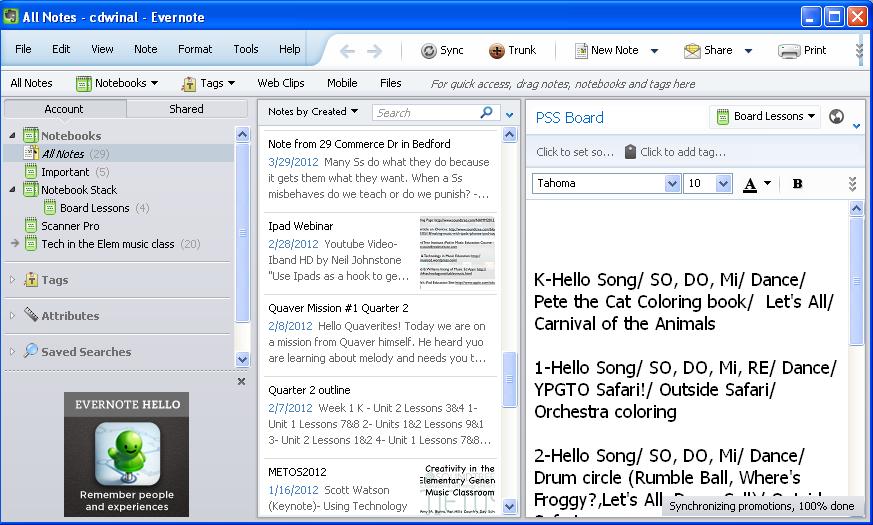
   So how can you do this in class with the Quaver Music Curriculum? With the younger kids you can do this by class, with video taping, scanning in papers and taking pictures you can show growth of each student in just one stored place. With the older students, having them keep their own would allow it to be used even after they leave you to the middle and higher schools. My schools use the OneDrive feature in Microsoft Office’s 365, you can also use programs such as Dropbox and the more popular Evernote (Sarah and her Portfolio partner in crime Stephanie Sanders use this one.)

Evernote

  Here’s an example of how to get started:

  •  Find out the overall learning objectives for the year. If you go solely by the Quaver Music curriculum check out lesson 35 at the end of each grade level. The end of the year assessment in that lesson is a great snap shot at what the students should know by the end of the year. Write down the most important learning objectives.

Screenshot 2014-05-09 10.18.27

  • Take the top 5 or 6 from those learning objectives to focus on for your artifacts.
  •  Now, take each artifact and next to it write down a way to assess mastery of that objective. Examples could be:
  1.   Video tape student performing song to assess rhythm, movement, etc.
  2.    Audio record students (individually or group) to assess pitch matching, 2 part singing, solfedge.
  3.   If there is a worksheet for the lesson, have the students complete it. You can scan in the work after to put in the portfolios.
  4.  Work for projects in the curriculum such as the 4th grade Rap unit or the 5th grade Commercial project can be put into the portfolio.
  • Once you have a list of everything that will be in the portfolio, add any rubrics you will need (because we all know administrators love data and numbers, having rubrics to back up grades will help)
  • Now that you have a list built, after you teach every important subject on your list make sure to add an artifact into the portfolio. By the end of the year you will have amazing Quavertastic collections of work showing how your student grew musically throughout the year (or years, start now! I wonder how amazing the portfolio would be if you started in Kindergarten and followed through with them all the way to fifth grade!)

           Portfolios show growth, they take the focus away from teaching to a bubble test and show students are actually getting it (lets face it, I have students who get it but cannot demonstrate on a written quiz or test. Portfolios are another option for those kids). If you have the QK-5 there are more ways than one to prove your students are learning. It just takes a smart and creative music educator to do it.

Hey! Are you on Twitter? I want to start a new hashtag meant just for awesome Quaver Teachers. Start using the hashtag #Quavermusicchat and let’s get connected!


My New Recorder QKarate

    YES! It’s Friday. Do you know how wonderful the word Friday is?? As Winter turns into Spring my want to be cuddled in a cocoon of blankets turns into a need to get up and GO. Don’t care where and don’t care for what I just want to go. I call it wanderlust, some people may call it Caged Animal Syndrome, and others..well it’s just Spring Fever. The week has really been a blur except for a few awesome teaching moments here and there. One that has stood out is how fast my 4th graders are catching on to recorder!

   I’ve been using the Music K-8 Recorder Karate method for the past few years. I find the program effective and instead of individual belts for each 4th grader, I actually have each class earn belts as a whole. It holds everyone accountable and creates a positive and competitive learning environment where everyone is included because they compete for their belts against other classes. I put their belt boards up on the wall so each class can see where the other classes are.

   My problem with recorder is with my schedule. I switch between two schools every marking period which makes learning recorder very hard if I was to divide it between quarters. So I have to cram in a whole year of recorder into 9 weeks. I have trouble keeping the kids on track if they go at such a fast speed earning belts. With the addition of the Quaver curriculum and sometimes just using ClassPlay, I came up with my own belt system (That REALLY works!) which students learn at a good pace, earn belts to keep them interested, and slowly build up the needed skills to play recorder. I added in some new belts to extend the learning. It is a mixed list between Quaver Recorder ClassPlay Songs and Music K-8 music.

White- Walk Like a Mummy/AAA/Glue Blues  Each Quaver song builds the skill of each of the beginning three notes of B, A, and G. The class must play all three songs correctly to earn their first belt.

Yellow- Hot Cross Buns/ Gently Sleep  Expanding on the first three notes of B,A,and G both of these songs put it all together and we use Hot Cross Buns from Quaver and Gently Sleep from Music K-8. Both songs must be completed before moving on.

Orange- Merrily We Roll Along Just upping the level of difficulty on B,A, and G. We talk about breathing at correct places and that is the main point I listen for in order for the belt to be earned.This is also out of Music K-8

Sheep- Perry the Sheep A Fun Quaver tune that gets the students singing and playing, it helps with getting ready to play a song quickly and songs with measures of rest in between.

Green- Recorder Shuffle A Quaver tune.Jumping up the tempo and adding 16th with our B,A,and G songs.

Purple- Miss Mary Mack Now we add the High C! Quaver is awesome.

Blue-  When the Saints Reinforcing the High C and adding the high D. Students step right up to this Music K-8 song

Red- Recorder Buddy A Quaver tune that is a little faster but reinforcing the High C and D

Weather- It’s Raining Music K-8 helps my students discover the lower register of their recorders with a low E.

Brown- Old MacDonald Going on with Music K-8 This song adds another note of E to the lower register and we focus on articulation using the third line which stays on the same note.

Black- Ode to Joy Because what can you change about the legendary Music K-8 Black belt? NOTHING that’s what.

Hawaiian Hawaii 6-0 These last three I call my fun belts or my black strip belts. Mixing half and eight notes this Quaver tune makes a real splash with my kiddos

Gamer-  Level Up Quaver Style DUETS! Great introduction to chords as we play like we are in Wreck it Ralph.

Bagpiper- Amazing Grace  A traditional Music K-8 tune. The only reason I leave this for last is because I bring in my bagpipes sometimes and play along.

     The most important part about this plan is that the student not only have stayed interested in the program and WANT and are EXCITED to come play in music is that I have been able to slow down the pace, give them time to practice, and have improved their skills times a million percent. When I was just doing the Music K-8 Recorder Karate I would  have to write in notes and say notes. I haven’t had to do anything like that this year. The students are tracking, and reading all on their own with only a few students needing extra support. I had one class this week play through Merrily We Roll Along without my help and by themselves together as a group. I was getting ready to teach it to them and found out I didn’t need to. Let’s just say they earned their Orange belt pretty quickly!

 Do you do Recorder Karate or Quaver Recorder in your classes? How do you teach it? In what ways do you make it your own?


 REcorderpic


Guiding, Engaging, Making

It’s Spring Break week for me. I’ve spent the week getting caught up on life and preparing for the last sprint to the school year finish line in June. It’s been a long and wonderful year already and with the last few weeks ahead of me, I cannot help but reflect and renew the learning environment in my room to provide students with a stable and solid place to finish the year loving, creating, and enjoying what music is all about.


Have you ever really reflected on your teaching? How many times have you looked around and seen a room filled with students ready to learn, finding the art of discovering and problem solving fun?


I know I’m not the only one guilty of showing my students to the objective instead of guiding them. We all have those days. What is the difference between leading and guiding? Showing your students entails lecturing, telling, and expecting only one answer. Guiding is asking questions, letting students discover, and showing them there are more ways to come to the correct point of thinking.

To be a true leader in your classroom makes students want to learn, keeps them engaged and thirsty to continue to make themselves better without you constantly standing over them holding their hand showing them the way.

Here are some ways I’ve seen some leaders in education guiding, engaging, and helping their students make their learning environment amazing:

  •    Technology – A tool to engage, A tool to organize, a tool to make life a little easier. When used in the right way, it becomes a meaningful experience that students can remember for a long time.
  •   Asking questions Let the students do the thinking, informally assess their knowledge.
  •     Building and Making- Letting students get hands on with their learning. Build products, problem solve, and get creative. You see a lot of this with STEAM lessons in classrooms, Makey Makey projects, and so much more.
  •     Centers –  Independent learning, you give them the goal and let them work towards it as you wander around the classroom guiding students to the outcome.
  •     Playing Instruments- True in the music classroom, being hands on, creating and reading music, all the while having your hands on an instrument.
  •     Projects-  When you give the minimum requirements and encourage to go above and beyond, it opens up new worlds of discovery and gives the students choice and leadership over their learning which in turn engages them.

  How do you consider yourself as a teacher? Do you show and tell or do you guide and engage? What things do you do to build a successful learning environment in your classroom?

IMG_0548

Creative Customizing with the Quaver Curriculum

  It’s been a heck of a week. Spirit week + Full Moon + Week before break = complete and wonderful chaos. It hasn’t left me much room to breathe much less make sure my lesson plans and materials are all in order. As we move into break around here I know I’ll be thinking about ways to finish out the year with my students and a full year using this amazing new Quaver curriculum. So I turn to their new customizable lessons feature for creative guidance and perfect organization!

   I’ve been using the Quaver Curriculum since September with some great results. The students have really taken to the new activities, songs, and overall cheery and positive feel to the program. I’ve mostly been using it organically lesson by lesson to see how it works and occasionally adding my own materials to it but not imputting them straight into the lesson. The lessons have been great, but as I go on with the year I started to want to put my materials straight into the lesson slide show itself. With the new Customize button I can now do that!

 2

    This button is a complete new lifesaver, especially since I can be very OCD when it comes to being organized and I always felt very weird trying to put together plans that involved other materials and figure out how to manuever from one thing to the next. Now I can put everything in one place. This button allows me to be anywhere and lesson plan as long as I have Wi-fi. I’ve lesson planned on a plane, I’ve lesson planned while excercising, I’ve even lesson planned while backstage waiting for my cue for a play. It has come in pretty handy!

    When I click on the button, it shows me all the screens for that lesson I can work with.

 4

    My schedule is very difference from that of a normal music teacher so I actually get to lessons at different times of the year compared to a normal teacher. The Remove slide feature has been a big help at taking away holiday themed songs and slides, especially when a Thanksgiving song pops up in January! It is also great for when you do not want to be jumping around from slide to slide and require a very sleek and flowing presentation tool for your lesson. You can also move slides around, I sometimes take a few extended activities that would fit perfect into my lesson and slide them up a little further looking closely at quick activities that would be great ways to start the class, or I could take a longer activity and slide it closer to the bottom of the lesson saving the best for last.

     My main reason for talking about this fancy Customize button is the New Screen feature.

 3

       Isn’t it pretty? This allows me to add in content I’ve created before on my own into my presentation tool allowing my entire lesson to be in one organized place helping with lesson flow and really overall class management.

  •        With the YouTube button I can add in video from my playlists I’ve already built ( Find my playlists here.) Just like with Safeshare.TV, Quaver cuts out the comments and extra videos allowing the user to just see the video you want them to see. I use a lot of video examples for instrument examples, orchestra performance, and I have a large list of Movement Break videos that students dance too if we have an extra minute or two at the end of class. I put those video straight into my lesson so I do not have to go searching through YouTube!
  •        The Audio button, I do a lot of recording in class, and saving the MP3s straight to my computer or Dropbox allows me to put those examples straight into a lesson. It turns them into a listening activity for the class come the next period.
  •       I think Document is my most used. My district is pro Responsive Classroom which asks teachers to have a morning message up on the board for the students every morning. I write mine in word and put them into every lesson I do via the Documents feature.
  •       Web Link lets me take websites that I already use on a regular basis (let’s face it, TI:ME Teacher of the Year, I use a lot of websites as tools to help me teach!) and links them straight into my Quaver lesson. My favorite two links I’ve put into lessons so far are Incredibox and Young Persons Guide to the Orchestra .
  •      I have TWO more large shows to get done before the end of the year and a big project with my 5th graders! (We are working on the Commercial Project!) The Checklist makes me never forget if I have something to say or announce. Lately I’ve been using it as a reminder of what songs I will be practicing with my students that week!  

     All of this can be found inside the rocking Quaver Music Curriculum. If you use Quaver, what kinds of things do you do to Customize your lessons? How do you make a tool like this your very own?

Playing Music with Light

 Back at last school for the year! Yay! No more moving around!! I cannot tell you how difficult it is to pick up and move all of your things from school to school every marking period. It truly burns one out very quickly. I’m at this school until the end though and couldn’t be more excited!

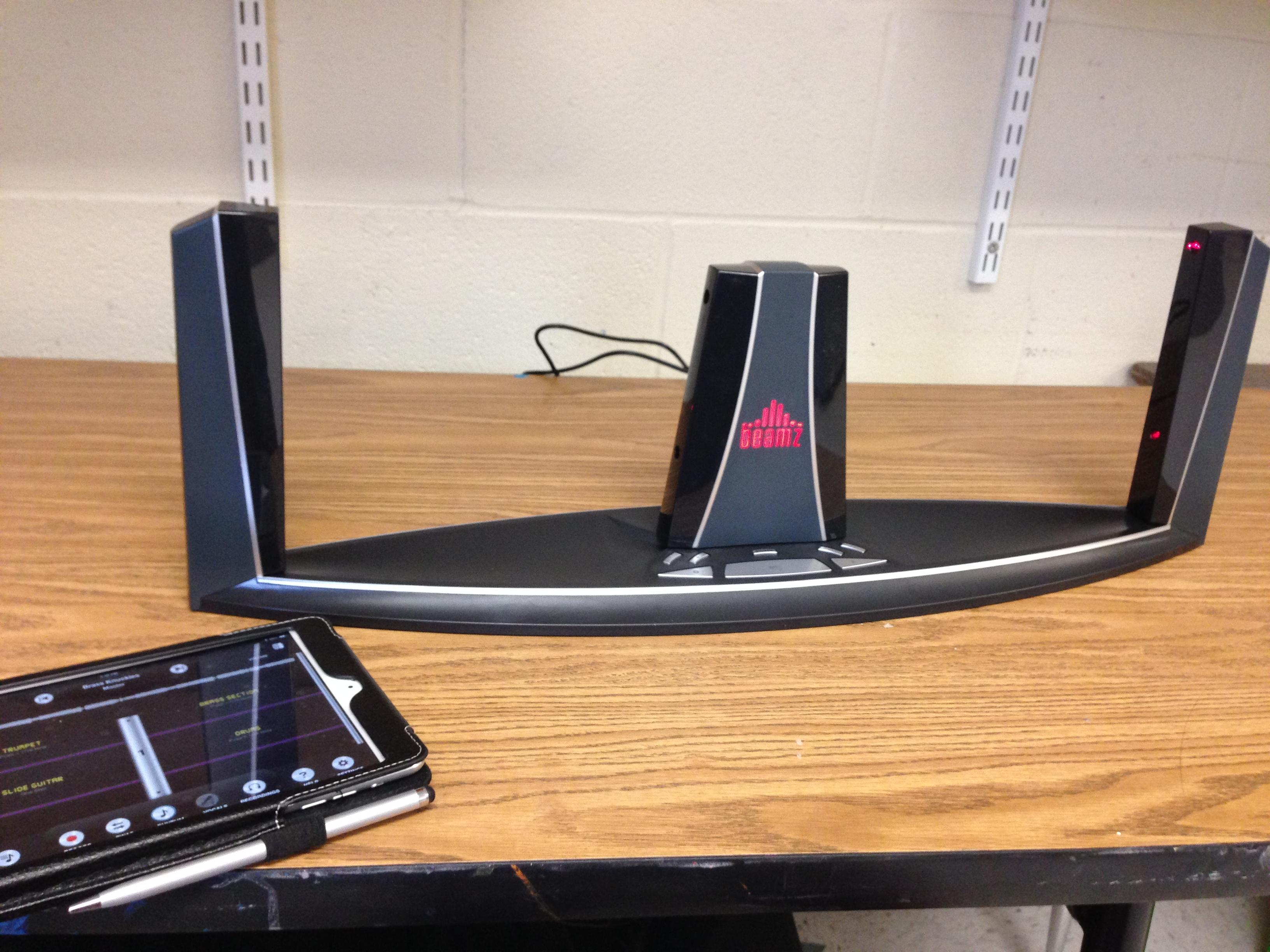
  This week I’ve put a lot of focus on a new tool I’ve acquired for my classroom called the Beamz. It is a midi laser controller mainly for use with the Beamz app or software to create and interact with music samples. The device has been used from a piece of DJ equipment to a therapeutic device. I was blessed enough to get two for my classroom to try out and see what I really could do with them.

 Beamz

      How it operates is you can either use an iPad or plug into a computer. Each connects the controller to the Beamz control board where the samples will play from.

    If you connect to a computer:

  •      If you have a PC you must download the software first before you use it.
  •      If you have a Mac it is plug and play.
  •      Using the cord provided plug the controller into the USB port on the computer with the other end into the unit. This will also power it up. Make sure the switch on the back is also set to Midi.

      If you connect to an iPad:

  •      Turn on your Bluetooth and download the Beamz Interactive app which is free at the app store.
  •      Plug the controller into the wall using an iPad charger block from the iPad you will be using. This will power up your device.
  •     Open up the Beamz app and make sure you have the volume up to hear the samples as they play.

       In the control board it will give you one instrument for each of the 4 light beams and each instrument will sound when your hand breaks the beam. You can add a rhythm to the background, switch instruments and even record yourself!

           Check out a little intro video I did:  My Beamz

        Now this device was first meant to speed up therapeutic outcomes, as a DJ instrument, and as an alternative instrument for multiply handicapped people but my goal is to find out what else I can use it for in the regular classroom.

  • I’m using as a center station, two people at a time hooked up to an iPad recording and creating their own tunes.
  • This would be a great device to use in a STEAM activity talking about how light works and hacking it to use as a normal keyboard or controller sort of like how the Makey Makey works.
  • Talk about how awesome this would be as a way for students to mix their own background tracks for original lyrics!
  • How about a dance party? Change up the tempo and talk about moving fast and slow or even turn the volume up and down and have students change movements.
  • This would be pretty awesome to add into a traditional ensemble.
  • You could even talk about duets, trios, and quartets having 1 student for each beam playing their own part!

      Endless possibilities right? I sure am excited about it and have found time to really get acquainted to the instrument myself. My Mom is using one of my controllers at her school this week and we have seen some really cool results!

       For more information and where to purchase check out www.thebeamz.com

Quick and Easy Centers

I am in the middle of moving schools and helping out with our high school drama production of Brigadoon by playing the bagpipes for them. It’s been a heck of a month and I have a sinking feeling it’s only going to get busier from here.

As this is my last week at my current school I decided to do some quick and easy centers that required little to no equipment so I could let the students have fun while I made sure my room was packed up and ready to go and my grade were done. Each is musical related and is a very simple activity the students can complete in 5 minutes or 15

photo%201

Cuptastic (Materials: Cups)- Take one cup and now you have a choice, either practice the cup song from the movie Pitch Perfect, or, create your own killer cup routine. Share your work with your friends when you are done.

photo%201-1

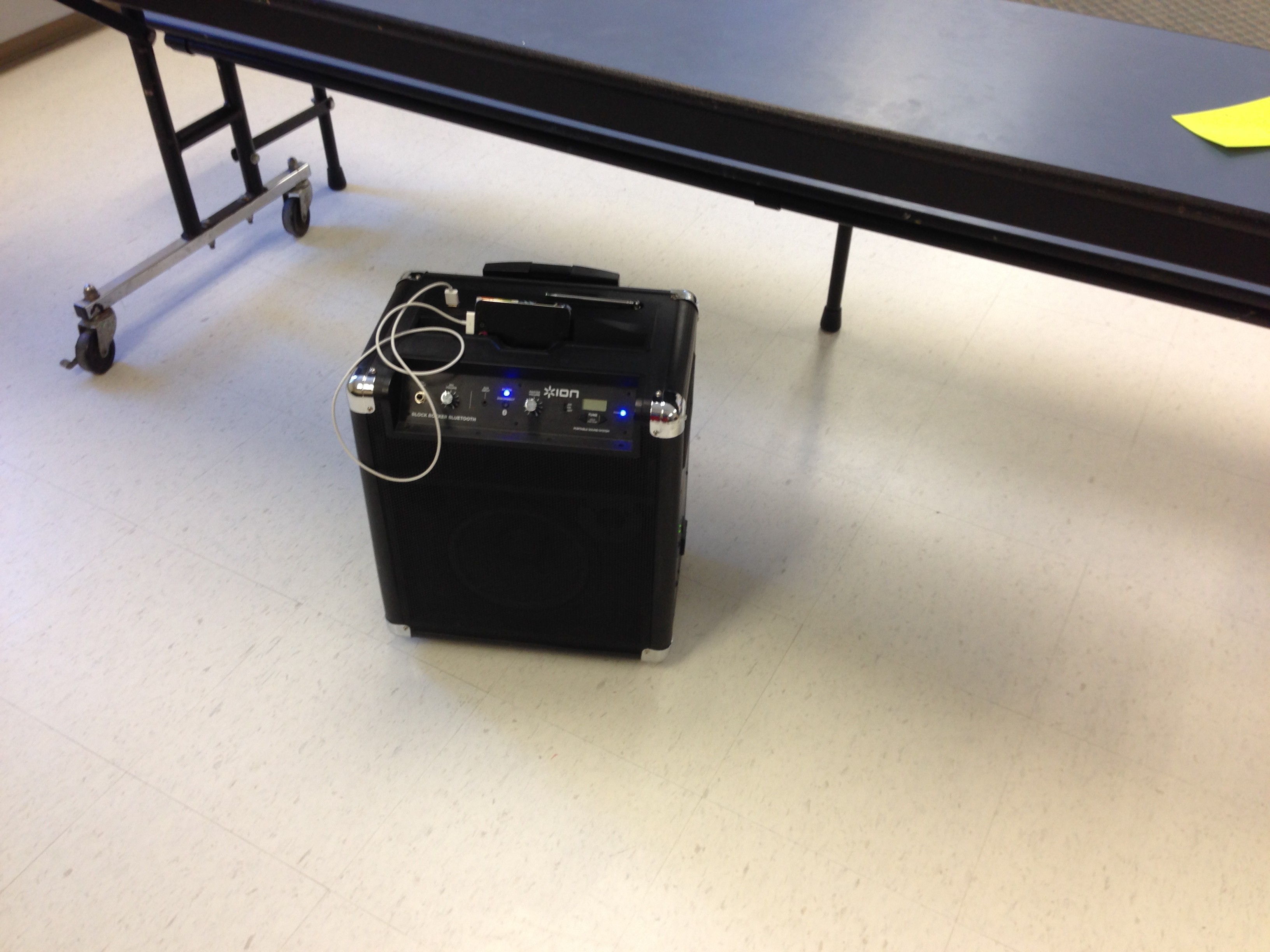
Freeze Dance (Materials: Speaker, iPod, Freeze Dance the app) Time to boogie! You can either play for outs or play for fun. All you have to do is choose a song from the playlist and get dancing! If you play for fun take turns choosing the song, if you play for outs, choose someone fair and trustworthy to be your judge. The app with take care of the starting and stopping all you have to do is FREEZE!

photo%202

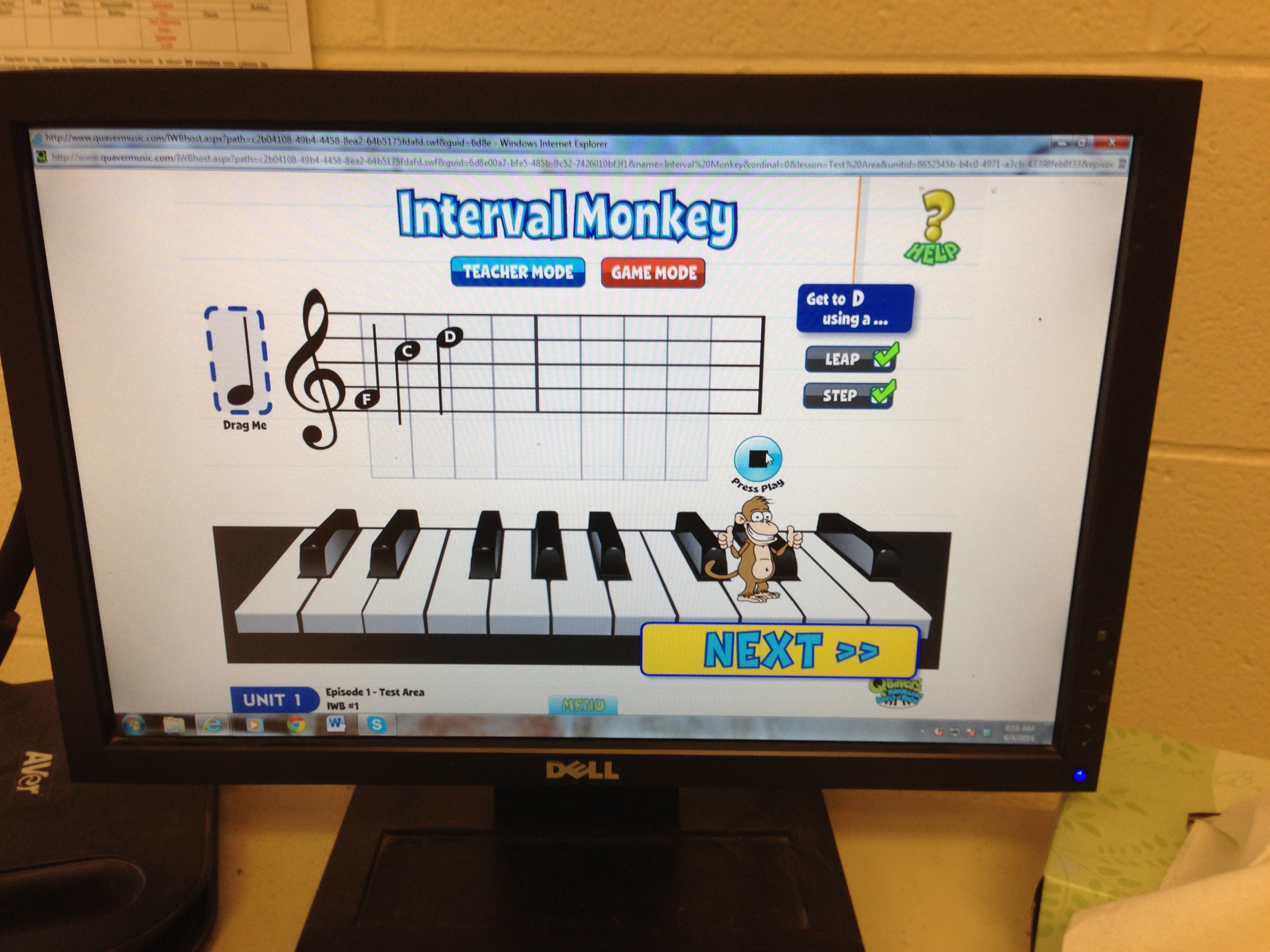
Interval Monkey (Materials: Interval Monkey IWB activity in Quavermusic, iPad with Splashtop app) The monkey needs to jump from one note to the next, but you need to help him figure out how. Look at the list of what you need to help him get from one note to the next (Step, Skip, Leap) and help him by placing the missing notes in the right spots. If you get it right he gives you a thumbs up, if you get wrong he falls over!.

photo%202-1

Music Video (Materials: Video Camera) Create a scene as a group about why music is awesome, be appropriate, make it meaningful. Record your scene before time is up!

               Simple, easy, and not a lot of materials. Made life fun in my classroom for the last week!


I Need Some Guinea Pigs (Warning: New Quaver Quest Inside)

Really?? It’s Friday??  This week seemed to go by way too fast. I was hoping to do a web quest challenge week again this week but ended up not having time because of other projects. What I decided was to write two quests now and get feedback on them. What I eventually want to do is to have a new “assessment quest” for each strand and for each grade level in the Quaver curriculum. Sort of an alternative or project based assessment to test the students know how after each unit. Each quest will come with a short rubric. The rubrics are rough draft so please help me with revisions so I can come up with a simple rubric that is easy to use and can be altered for each quest. 

What I want from you is that if you use one of these quests PLEASE let me know how it goes and give feedback in the comment section under neath this post. If I am to take on an idea this big I’d like to do it right and do it well!


5th grade (Listening)

1.) Jukebox- Head to the Jukebox in the Shop and listen to the “Middle C Song” while you are listening please use a scrap piece of paper and draw a listening map showing the melody contour of the piece (line contour same format as the Songbrush app.)

2.) Songbrush- Take that listening map you did in step one and transfer it to the Songbrush app in the Shop. Listen to it after you are done and write two sentences on that scrap paper describing how it sounds compared to what you thought.

3.) QGrooves- Pick a partner and each of you write a QGrooves piece with a specific form (AB, ABA, ABACA), take turns trying to guess what form each of you has created.

Rubric-


Excellent- The student can compare listening maps and identify form with no assistance from the teacher. 
Proficient- The student can compare listening maps and identify form with little assistance from the teacher. 
Fair- The student can compare listening maps and identify form with a lot of assistance from the teacher. 
Novice- The student cannot compare listening maps and identify form even with much assistance from the teacher. 


2nd (Composing)

1.) Songbrush- Go to the Shop and create a melody painting where the notes go up and down in the picture.

2.) QSplat- Head to the Arcade in your Music Room and click on QSplat, you need to know the right length of the notes for this game. Practice figuring out how many beats each note has.

3.) QComposer- Now we have to create your melody. Travel to QComposer in the QStudio, you will create 3 measures of melody using only half notes and quarter notes. Make sure the notes go up and down and there are only 4 beats per measure!

Excellent- The student can compose a piece using correct note duration and a varied melody contour with no assistance from the teacher. 
Proficient- The student can compose a piece using correct note duration and a varied melody contour with little assistance from the teacher. 
Fair- The student can compose a piece using correct note duration and a varied melody contour with a lot of assistance from the teacher. 
Novice- The student cannot compose a piece using correct note duration and a varied melody contour even with much assistance from the teacher. 

 IMG_1983Have a Wonderful Quaver Adventure! PLEASE let me know what you think!

District iPad Conference Materials

Just running by with a quick post this week! I’m all over the place this week and to top it all off I have been fighting yet ANOTHER cold which has made me slow down quite a bit! Chugging Emergen-C and eating ColdEeze like it is my job! Yes I know, I really need to be in a bubble or something.

     Last night I pulled off a drive through presentation (ran in last minute just started talking during my slot, and then really just ran out. It was fun!) I talked about using the SAMR method for integrating iPads into the classroom at our district iPad conference.I then went on to show some really cool apps and then gave a few resources to keep collaborating and learning which included a big Pinterest board I put together. It was my first really non music tech presentation I’ve done in a while, go EdTechies!  Below is my handout and my power point with all the links and information from my session.

Easy iPad Integration for the Technology Hesitant:

Handout- Download Here

Powerpoint- Download Here

If you have trouble downloading the materials head to my conference presentation page to download from there: http://www.cdwinal.com/conferencepresentations.htm

IMG_0318