Skype into the New School Year

    It feels so very weird not getting ready for the new school year. Usually by this time my room is unpacked, lessons are planned, and my new equipment is unpacked and ready to go. In a way I do miss it, but I’ve been so busy and so very excited with the new job my mind has been very focused lately.


I do still miss unwrapping my new equipment at the beginning of the year. So shiny and new and ready to be used in the classroom. One thing I remembered was how awesome it was to get new tech equipment. Last year I got a brand new Snowball Microphone and webcam, you know what I did with it? I Skyped.

Now some might be hesitant to Skype, the work of finding someone to Skype with, setting up a time, getting the equipment, testing it out. It all takes a lot of work, but I raise my right hand to you and solemnly swear that it gets easier and even more fun the more you do it. (I also solemnly swear that I am up to no good but that’s a whole different story.)  With Skype you have so many options to connect your students with the outside world. Skype gives you and your students a key to unlock the door that leads outside your classroom walls and allows you to explore the world together and meet new friends along the way.

With websites like https://education.skype.com and social media sites like Twitter you can easily find colleagues across the globe to connect with. 

Just last year alone I Skyped with 10 different classrooms with my students. Each an enriching learning experience that left the classes walking out and talking about it well into the following few months. It leaves a lasting impression on them. There are so many things you can do over Skype in the classroom. There’s a few that stick out to me for a music classroom:

Performances- I had my 1st and 2nd graders working on grade level shows, we Skyped in with several classes and sang them a few songs to help us practice being in front of an audience. You can do the same with your classes, have the students sing for any class that is willing to listen. It will not only get them comfortable with performing, but is also a great activity for performance etiquette.

Project Presentations- Have a project the students are presenting? Make it fun and invite an expert or maybe a well known school figure into your class via Skype. They can make comments, provide encouragement, and just be someone new to see the students work and break the everyday cycle of students presenting to you and their classmates.

Guest Speakers- Talking about a certain subject in class is a perfect time to invite in an expert via Skype. From composers to audio engineers to other teachers. You can bring in just about anybody into your classroom for little to no money to talk to your students!

Guest Ensembles- Ever think about how you wish you could bring in a Symphony Orchestra or a Jazz Ensemble to your students? Skype is an easy and effective way to bring a full performance into your room. The students can hear live music, be able to ask the performers questions, and see instruments up close and personal.

Song Shares- The simplest and most done form of Skyping for the music classroom. Each class shares a song with one another, students can compliment each other and then ask questions to each class. This is a great one for a Skyping first timer.


What would you use Skype for in your Classroom?

  IMG_0067


Be sure to share your Skyping experiences!

Musedmot Archives

This week has been INSANE. I’ve basically been to the other side of the country and back in just a mere few days. I have been out since the 4th and have yet to be home yet (Almost there! On the last stop!) During this time Musedmot went on. This event is my PD baby, I eat, sleep, and breath Musedmot and was at first heartbroken to know I had  to do a presentation the same time Musedmot went on, but thanks to amazing moderators @TheYellowBrickRoad and @ClarinetRachel, scheduled tweets, loyal participants, and  a  new Challenge feature  #musedmot lived to see another day!  

With my new position change for this year I will be scheduling smaller Musedmot events throughout the year! 

 Watch for our first back to school chat August 13th at 7pm!


The day was scattered with fantastic Twitter chats if you would like the archives visit the Storify link:

https://storify.com/musiccargirl14/musedmot-2014

      Up on the site until the 16th will be the Take the Challenge! page. This is meant to be a reflection activity. Allowing us to look back on the year we had and prepare even better for the year again. To take what we’ve learned and learn even more. I took the challenge, actually I took the challenge every year of my teaching. I dare you to take this one. Even if you don’t share you’re answers take it anyway.  Click Here  to take it.

            Thank you to those of you who keep coming back event after event. I don’t plan on stopping these anytime soon, just have to keep changing them up until we find the right fit. Keep August 13th on your calendar at 7pm we will chat musedmot style getting you ready for back to school! Stayed tuned to www.musedmot.webs.com for more even announcements throughout the year, we will have everything from live webinars, to G+ Hangouts, and even more twitter chats. This is going to be a year you won’t soon forget.

10408163_348264545320602_6190343159233934757_n

Musedmot Man

So I Got This Pen

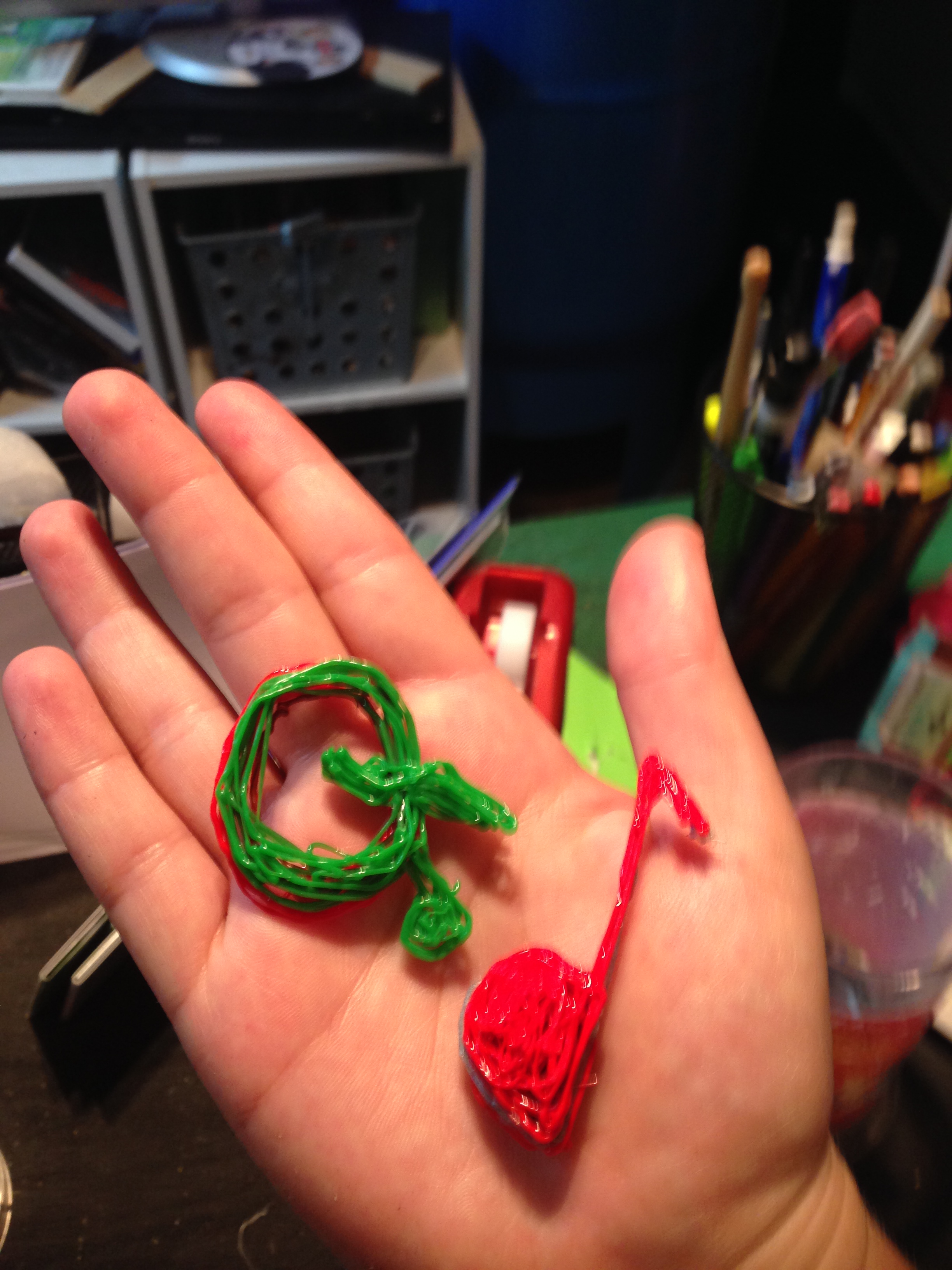
Well its been a wonderful sunshine filled couple of weeks, I’ve been diving more into learning how the Maker Movement works and have thought up some fantastic new blog posts on the subject! So watch out!  I’m coming back with some insight on a fantastic new gadget I’ve acquired called the 3D Doodler which is a 3D Printing Pen!

So what is this 3D Printing pen? Many of you have probably seen so many stories out there on the new 3D printing craze :

It has become a resource and tool in the Maker Movement that is taking education by storm. Students are gaining the skills to be able to design and manufacture 3D products that they otherwise would only realize on paper sometimes never see come to life.  

The printer takes plastic and melts it just enough to become pliable to mold into whatever the user has dreamed up. The plastic then hardens within seconds to become a 3D object. With the printing pen it has the same sort of idea but you can relate the pen more to that of a hot glue gun, only the pen does not melt the plastic to the point of liquid like the glue and with the pen you can free hand what ever you want!

photo 1

My Sister trying it out!


Now imagine this in the classroom. There are so many possibilities for making, I see just in the regular classroom students making 3 D shapes to study in math, learning about engineering and building their own buildings, even building their own simple machines to study in science!  What else can you see using this for in your classroom?

Some of my creations!

Some of my creations!

Going even further into  the music classroom I wondered long and hard  about how to incorporate it. What about  3D sound waves for studying pitch and science of sound? Or how about building your own chord machine to help students identify chords? Maybe even printing your own instruments for studying about different instrument families?

How COOL would it be to discuss the string family and then build a model of a violin right in front of your students eyes? ?

Another tool to add to my list of Maker Movement resources to explore even further!  Do you have access to 3D printing? How would you use this in your classroom?

  Want to learn more about the Maker Movement from educators like yourself? Check out #ITLChat on Twitter to connect with some amazing teacher leaders!

Recycled Percussion

 This was so awesome I couldn’t help but post. A little over a month ago after some thought I had a 3rd grade class start to use my left over office supplies to build their own recycled percussion instruments. It was a great way to get rid of office supplies and I had an extra 20 minutes a week with these kiddos so this was a perfect activity.

   What I had to work with:

  • Scissors
  • Glue
  • Masking tape
  • Duct Tape
  • A big box of folders, paper clips, rubber bands, and scrap paper

How long it took– 3 weeks

  •   Week 1 was explaining and starting the build
  •   Week 2 was continuing to build
  •   Week 3 was getting together and jamming on our new instruments!

      What we were learning about– Instrument families and this was a focus on strings and percussion instruments.

  •    We used the Quaver Curriculum  with a focus on the 2nd grade lesson 25
  •    We also watched the Quaver Fretted Instruments and Percussion episodes and used the classrooms for extra activities.
  •     We watched a few key scenes in STOMP Out loud!
  •    We also did the Strings Savannah and Percussion Paradise areas of the Young Persons Guide to the Orchestra click adventure

The kids had the lead on most of this. They knew what a string instrument qualified as and used rubber bands to create different pitches, and they knew what a percussion instrument qualified as and created instruments that could be hit, shaker, or scraped!

With the final jam I had gone into QComposer at www.QuaverMusic.com  ahead of time and had created two different 4/4 rhythms ahead of time. We played both one at a time, then divided up into ensembles and played together, then switched parts.

   After, kids got to bring their instruments home!

       It was a great ending activity to learning about instrument families, showed students you can make an instrument out of anything, and was a great hands on activity that had the students learn by MAKING something!

IMG_2207

Musedmot: The Social Media PD in your PJs is Back

I’ve said it so many times my head is spinning, Musedmot is coming up quick!  A professional development opportunity built by a music teacher for music teachers. I wanted more from my professional development and wanted to do it for free, so what happen? Music Ed Motivation Day did thats what! 

We congregate on Twitter and talk all morning and into part of the afternoon about various topics using the #musedmot hashtag. Sprinkled in-between are Google Plus Hangouts you can join in or watch LIVE and Facebook discussion posts posted throughout the day. It use to be three times a year, but since the announced change that we were cutting down to once a year..12 MONTHS have almost come and gone completely. Can you believe it? It’s been almost a whole year since I’ve gotten my dreaded Musedmot cold!

As in the tradition, I’ve made changes to try to make the event better, more hands on and new visual changes coming as well. I want you to participate, talk, and have some fun too. There are no right or wrong answers, just creative ideas! Cut out the lurking in the shadows and come join us!

On the fence? think you’re not techie enough to keep up? oh pish posh, you’ve got help! On our website there is a Registration page where you can sign up for the hangouts and put your Twitter handle in there so I can find you and help you get in on the action! 1 on 1 tech support just cannot be beat!

Some things you should know:

  1. The big event starts at 10am est on Saturday August 9th!
  2. There will be a new bi-monthly #musedmot twitter chat to help keep you motivated through the year!
  3. I AM LOOKING ACTIVELY FOR MODERATORS, PLEASE CHECK OUT THE SCHEDULE AND LET ME KNOW YOU’RE INTERESTED! You don’t need to be an expert to moderate!
  4. I always am looking for corporate sponsors. We can work out anything from advertising to giveaways to even letting a rep from the company come in and talk to our participants about their product.
  5. This is a come and go as you please event, you are more than welcome to come in and out during the day.


Want to know more? Check out our website: www.musedmot.webs.com 

Musedmot graphic

That’s No Longer an Excuse: Turning Everyday Objects into Classroom Technology

   Its been a strange week for me, having attended the first 3 days of my teacher professional development and then taking the last 2 to start getting myself into my new routine my brain has been all over the place. I am trying to figure out a good routine for working from home, just the fact that my day is not scheduled down to the second is so very weird. I know teachers out there can relate, we go full throttle for so many months most days unable to even know the correct time on the clock until its time to go home and now that I can sit outside on the patio and work on certain projects at my own pace for hours occasionally getting up for food, maybe a walk, whatever I need is SUCH a different and very awesome feeling. I still love days going full throttle, but being able to sit and really concentrate on something is freeing!

What has always helped make my full throttle days easier? technology. Without my project and my computer I would have had a lot of trouble getting through. They allowed me to minimize my trips to the copier or the hours creating poster visuals and just have everything in one glorious paper free place. During lessons I could add that level of engagement with interactive websites and curriculum materials from places like Quaver Music and Music First which had kids memorized.

I couldn’t have lived without my technology in the room and its becoming a staple in every classroom, that is why I’m so surprised when someone tells me they DO NOT have some sort of technology in their teaching space. I ask why and I get answers like “there’s not enough money” or “they don’t think there’s space in my room” or even “they don’t think I’d use it”. Well phooey, time to give up right? WRONG! It’s time to get creative.

Look! I made an iPhone/iPod projector for 5 bucks just to prove a point for this blog post! (and it WORKS!)

securedownload


 Check out how to make this at this website

   There are so many ideas for low cost classroom technology alternatives out there on the web that the excuse “I just don’t have it” is really not an excuse to me anymore. Tell me you don’t have a projector I will MAKE you one right there on the spot. Once you get creative with these low cost alternatives the last objection “they don’t think I’ll use it” flies right out the window! Sometimes, you just have to go a little further to prove to your tech department and administrators that you too can use technology successfully and creatively in your music classroom.

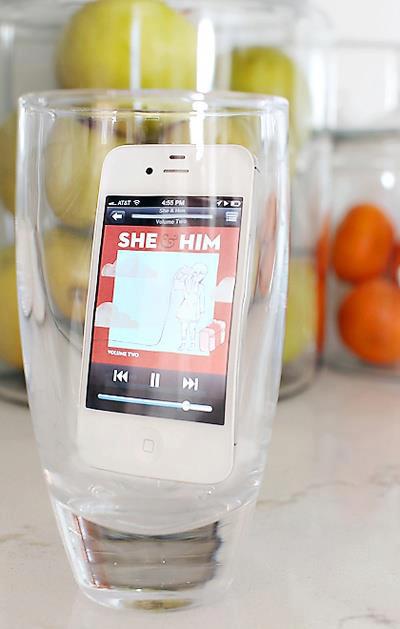
  No speaker system? Have a glass handy?

306056_327668937336882_1675843162_n

Or if you have a second you can throw together this puppy with a cardboard tube and two solo cups

5df3e1a2dcc630561a94c2fc1914445d

      If you’re really ready for a challenge and itching for a smart board, try using a Wii remote control: http://johnnylee.net/projects/wii/ 

        Those excuses people give me for not having technology in their classroom? Yeah, I’ll make you a projector or set of speakers on the spot, I know you’ve got an iPod or smartphone handy everybody does. There are so many of these awesome hacks online in places like Pinterest .

     So remember, technology doesn’t have to be a fancy state of the art projector or a 1,000 dollar speaker system. If you’ve got 5 minutes and the right stuff sitting in your room or house, the possibilities become amazing.

Not a Goodbye

I write this post with some different emotions, it’s taken me a few months to find the right words to fit what I want to say so that all will understand my actions. I’ve had an amazing opportunity placed down in front of me and I’ve decided to take it. I am leaving my position as elementary music educator for the Laconia School District and will be joining the Quaver’s Marvelous World of Music team full time as their new Northeast Key Accounts Representative!

I think I saw some of your mouths drop (others I know are probably waving their hands in the air saying “bout time!”), let me explain.


cQmBYcc

For the past few years I have been working in the same district I was born and raised in. I still live in the same house, and everyone knows my name where ever I go in town not because of my work, but because they’ve known me all my life. I always had pictured this job in the schools here as a first job position. Something to get my feet wet and experience under my belt while I looked at other places in the country to make a permanent move too. I do love my school district, they’ve been so good to me these past few years but I’ve been itching for a change, and it is time for me to move on and experience someplace new. I have wanderlust in my heart and places to see.

I completely gave this job all I had and will miss the kids terribly, but I’m still young and have plenty of time to experience something new. I will keep my certification up in the state of NH for as long as it allows just incase I miss the classroom too much. I also want my Masters so much it almost hurts, I haven’t had the time or the funds to go to grad school yet but I intend on using this new adventure to help me further my education and continue to learn and grow as soon as I get settled in and time allows me to do so. I might not be a music educator in the classroom, but I will be everywhere else.
This change also brought some speculation as to if my other ventures in the music technology world would continue. I am saying this now, you won’t get rid of me that easily. Do not consider me out, I will still be blogging, I will still be running musedmot, I will still be the music techie everyone knows. My adventures might be documented a little differently than before but they still are adventures in education. As I promised to continue learning, I hope to take the ideas and philosophies I collect from classes and materials and bring them with me into my online and conference persona.

I’m going to a place where smiles are plenty, hard work is acknowledged, and  creativity and inspiration flourish. I know so many of my new co workers already there are no nervous butterflies only excitement shown by jumping up and down with the occasional giggle fit. With what I have been told, I am so excited for this new venture. The travel, the meeting new people, it truly is going to be different from the scheduled school day I am so use to, but I’m so ready for it.

My students are obviously sad for this change, but know this was a great move for me and continue to say positive words as the school year ends. It makes me feel so loved to hear how much I’ll be missed and I really hope I won’t burst out in tears. I leave my classroom with no regrets because I know I did what I set out to do. I got kids to love music. We sing, we dance, we play, we create, we listen, and they walk out of my room still doing it. I created life long lovers of the arts and I know I’m leaving having made a difference.

So this is not a good bye to teaching, this is not a goodbye students, a goodbye PLN. This is a hello to helping teachers, hello to new sights and new experiences and documenting it all, hello to new challenges, and a BIG hello to being a part of Quaver’s Marvelous World of Music!

Instrument Families Taught with Tech

Its been a VERY long week, only one more week left of school for the kids and they are bouncing off the walls like the school is a bounce house! I can blame it on the spring fever right?

I save my unit on instrument families as one of the last ones of the year. Not because that’s just where it falls but because it is one that can keep students engaged. We talk about instruments, we see some instruments, we listen to them, we even play a few games that help us learn about them. It’s a great ending of the year lesson to keep you going all the way to summer. What makes my instrument unit stand out above the rest of my units is how much technology is involved.

There are several websites and tech tools I use to bring the instruments of the orchestra to life:

1.) dsokids.com– Perfect website with pictures, audio clips, and brief histories of some of the major orchestra instruments. I normally cannot bring most of them into the classroom for students to see so having this website is a huge help and introduces my students to a new world of music. I also play a game of four corners where I place 4 signs around the room one for each instrument family and play an audio clip of an instrument and they have to figure out what the instrument is and go stand next to the family it belongs to.

2.) Melodystreet.com-They have fabulous apps to teach younger students about the instruments. Linked is their YouTube channel which has some great videos for younger students (K-2) to watch and get excited about classical music and instruments. Two of the videos are for their interactive book which is a big hit in my classroom. My kindergartners actually remember more about the orchestra after watching those videos and using the apps as opposed to other methods of instruction I have done.

3.) Carnegie Hall Listening Adventures Young Person’s Guide to the Orchestra– This is the best thing since sliced bread. An interactive click adventure highlighting all the families of the orchestra in an in depth and engaging safari through the jungle to find and collect all of the instrument animals and bring them back to the stage for a grand performance! This may take a few classes but it is totally worth it. My kiddos and I put on our safari hats and dive right into the challenges.


What ways do you teach instruments of the orchestra? How do you use technology to open up a whole new world to your students?

carnegie_young_persons_guide

Apps to Help You Through A Conference

We’ve all been there, big conference we are SO excited for. We get everything ready to go, the paperwork to take the days off,  asking for a sub, picking the right workshops. It all boggles the mind with how much work needs to be done for some fun but we all know it is totally worth it in the end. I thought it would be cool to list some must have apps that can help you keep organized and not only give you the opportunity to have a lot of fun but also learn a lot as well. Some of these are my recommendations, and some were polled from my Twitter PLN!

IMG_1880

Tripit– A complete must have for any avid traveler. It organizes all of your travel so you can have all your flight, hotel, and anything else you need in one place. This app has a fantastic feature that allows you to forward all of your confirmation emails to them and it automatically gets put into the app for you!

Evernote– Ultimate note organization app. You can take photos of presentation slides, take voice memos, or just type the important points and keep them all in one place. This app also automatically syncs with whatever devices you have the app downloaded to. I can take notes on my iPad and have them automatically sync to my computer.

Guidebook– Many conferences are starting to go mobile with their conference guide books. Check out this app and see if your upcoming conference is on it. You can see all of the sessions for the conference, make your own schedule, get alerts, and make a list of all the exhibitors you want to see.

Notability– A fantastic note taker app. Recommended by many, this app takes the place of a pencil and notebook and allows you organize your notes all into one place.

Twitter– Twitter is becoming the ultimate tool in collaboration and connection especially at conferences. Find out if the conference you’re attending has a hashtag. You can talk to other attendees and maybe even meet up and make new friends.

QR Code Reader and Scanner– It is popular for many presenters to put QR codes into their presentation for you to be able to download extras or go to the link they are talking about. Having a good QR code reader will always come in handy for grabbing those extras. Some conferences use QR codes to make the conference more interactive by having QR hunts where you can win prizes!

PDF Expert– Because who doesn’t need a really nice PDF organizer and reader?


form

What’s your favorite app to use at a conference that you can’t live without?